Connect Pluto Profit
Meta tells you what your ads sell. Pluto Profit knows what those sales leave after product costs, payment fees, shipping and the ad spend itself. Connect your store, and the Agent, Loops and the agents you connect over MCP or the API can see whether the store, its products and its ads actually make money, and optimize for profit instead of revenue or ROAS.
A ROAS of 3 looks good, but when product costs, fees and shipping take more than two thirds of revenue, the ad loses money. Profit is what's left.
Connecting
Owners and admins connect one Pluto Profit store per workspace:
- In Pluto Ads, open Integrations and select Connect Pluto Profit.
- Sign in to Pluto Profit if you aren't already.
- Choose the store this workspace advertises and select Allow. Pluto Ads asks only to read profit, orders, products and costs. It never changes anything in Pluto Profit.
- You're back in Integrations. The banner says "Pluto Profit connected", and the card shows the store.
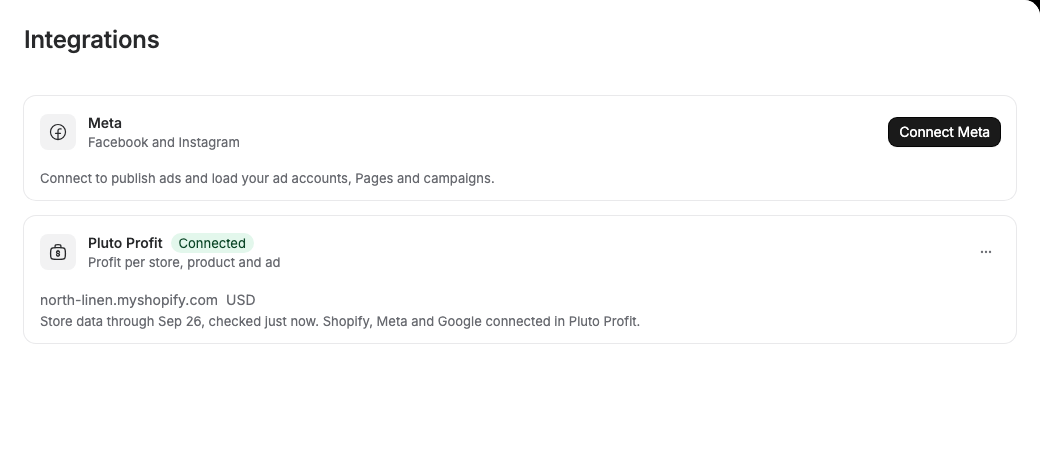
The card shows the store's name, Shopify domain and currency, who connected it and when, and how current its data is, for example "Store data through Sep 26, checked 2 minutes ago".
The connection acts for the person who approved it. Pluto Ads sees only what that person can see in Pluto Profit: if they leave the Pluto Profit account or lose access to the store, profit stops until someone reconnects.
If another workspace in your organization is connected to the same store, that's fine when both workspaces advertise the same store.
Members see the connection but can't change it; until it's connected, the card asks them to ask an admin. Guests (clients and reviewers) don't see the card or any profit.
When a sales channel needs attention in Pluto Profit, for example a disconnected Shopify or Meta, the card says so: profit can be incomplete until it's reconnected there.
Reconnecting and disconnecting
To connect again, for example to switch stores, after access was removed or to move from an API key to signing in, open the card's menu and choose Reconnect. When Pluto Profit stops giving the workspace access, the card says Reconnect needed and Pluto Profit needs to be connected again with the reason. Profit stops until an admin selects Reconnect Pluto Profit.
To disconnect, open the card's menu, choose Disconnect, then Disconnect again to confirm. This removes the connection from the workspace and deletes Pluto Ads' access tokens. To remove Pluto Ads' access in Pluto Profit as well, open Settings, Connected apps in Pluto Profit and remove it there. Removing it there disconnects every workspace you connected with your Pluto Profit account.
With an API key
Signing in is the way to connect. If you can't, for example when a developer sets things up for you, connect with a store's API key instead:
- In Pluto Profit, open Developers and create an API key for the store. A publishable key
(
pk_plp_...) is enough: Pluto Ads only reads. - In Pluto Ads, open Integrations and select Use an API key instead on the Pluto Profit card.
- Paste the key into Pluto Profit API key and select Check key. Pluto Ads shows the store the key belongs to, its connected channels, the key's last four characters and the store's currency. Each key belongs to exactly one store, so this is where you pick the store. If another workspace is already connected to it, Already connected elsewhere says which. Use another key starts over.
- Select Connect store.
The key is stored encrypted and never shown again; only its last four characters are kept to tell keys apart. To switch stores, choose Use another key in the card's menu, check the new key and select Switch to this store. Disconnecting deletes the stored key; the key keeps working in Pluto Profit until you revoke it there. If you revoke the key in Pluto Profit, the card says New key needed and Pluto Profit no longer accepts the key, and profit stops until an admin selects Paste a new key and connects a new one.
Agents and API clients can start the connection too: they get a link for a workspace admin to open in their browser, since approving in Pluto Profit is always a person's choice.
What your agents can see
With Pluto Profit connected, the Agent and your MCP and API clients get three profit reads for any period of up to 366 days:
| Read | What it answers |
|---|---|
| Store profit | Revenue, costs, gross, contribution and net profit, blended ROAS, POAS, MER and the break-even ROAS, plus spend and platform-reported revenue per ad channel |
| Product profitability | Per product: revenue, product costs, gross margin, the fees, shipping and ad spend allocated to it, and what it left after them |
| Ad profitability | Per Meta ad, ad set or campaign: whether it made money, as an estimate |
Some terms:
- POAS (profit on ad spend) is gross profit divided by ad spend. Above 1, ads paid for themselves.
- Break-even ROAS is the ROAS at which ads exactly pay for themselves. An ad whose ROAS is below it loses money, even if its ROAS looks good.
- Contribution is what a product or ad left after its own costs and ad spend. Negative means it lost money.
Ad profitability is an estimate. Pluto Profit reports profit per store and per product, not per ad. For each ad, Pluto Ads applies the store's break-even ROAS to the purchase value Meta attributes to the ad: estimated contribution = purchase value / break-even ROAS - spend. It assumes the ad's sales carry the store's average margin and trusts Meta's attribution. Every answer says it's an estimate.
Unknown stays unknown. When Pluto Profit is missing a cost (for example a shipping cost it can't resolve), it reports profit as unknown, and so do your agents. They never treat a missing value as zero. An ad without purchase value in Meta has no estimate rather than a made-up loss.
Ask the Agent things like:
- "How profitable was last week?"
- "Which products lose money after ad spend this month?"
- "Which ads are unprofitable over the last 7 days, and should we pause them?"
Loops
Loops get a Check profit block in Check. It continues only when an ad's profit estimate matches what you set under Continue when: Estimated contribution, Estimated POAS, Estimated margin before ad spend or the Verdict (profitable, unprofitable, break-even or unknown), over a period you choose. It starts with estimated contribution below 0 over the last 7 days. It uses no AI. When Pluto Profit has no figure for an item, the item stops there: a missing value is never counted as 0.
To pause ads that lose money, start from the Pause losing ads template and replace its Check metrics step with Check profit.
An Agent step can optimize for profit too: set its Goal to Profit.
Without Pluto Profit connected, Check profit is shown with "Connect Pluto Profit" and can't be added, and the Profit goal can't be chosen. See Loops.
Freshness
Pluto Profit doesn't push changes, so Pluto Ads reads figures when they're asked for and reuses them for about a minute. Each answer says when Pluto Profit computed it and the latest day of synced store data. If Pluto Profit can't be reached, agents get its last figures, marked as not current.
Developers: see Profit in the public API and the profit tools in the MCP catalogue.