Publishing
Publishing creates your launch in Meta: a campaign, ad sets and ads that can spend money. This page covers who can publish, what you approve, what Pluto creates, how to follow progress and fix errors, and how to change, pause or delete what is live.
Who can publish
Every owner, admin and member of a workspace can publish. API keys, agent clients and connected agents can publish only when their access includes publish (see Agents and Developers). Without publish access, the Publishing panel shows View only: you can see what is live, but not publish, pause or change budgets.
Publishing needs a connection to Pluto's servers. Offline, the buttons stay off until you are back online, and edits still waiting to sync hold the publish until they arrive (Saving your changes).
Checklist before publishing
Open a launch and select Launch ads in the top right. If you can't publish, the same button reads Review launch and shows the same review without the publish step.
If anything is missing, you see Needed before publishing first: everything Meta needs before the launch can publish, per launch, ad set and ad. Each item has Fix, which opens the exact place and puts the cursor in the field: the launch settings section, the ad set's section (for example Locations for the EU beneficiary and payer), or the ad's field. Fix first item starts at the top. Typical items:
| Item | Where Fix takes you |
|---|---|
| Connect Meta or Reconnect Meta | Integrations (Connect Meta) |
| Choose an ad account, or the account is disabled, unpaid, closing or closed | Launch settings, General, Ad account |
| Choose a campaign | Launch settings, Campaign, Campaign |
| A new campaign without a name or budget | Launch settings, Campaign, Campaign name or Amount |
| Choose a Facebook Page | Launch settings, Identity |
| Add creatives | Adding creatives to the launch |
| Create an ad set or Move creatives into an ad set | A new ad set, or the Ungrouped column |
| Missing copy, an invalid website URL, media still failing | The ad, at that field |
| Countries, EU beneficiary and payer, devices, placements, pixel, budget or schedule of an ad set | The ad set, at that section and field |
| Update launch schedule (the time is in the past) | Launch settings, General, Schedule |
| More than Meta allows: 200 ad sets per campaign, 50 ads per ad set, or 5,000 ad sets or ads per ad account | The ad set, or split the launch |
You never have to finish these to save your work. Launches, ad sets and ads save as drafts with gaps; the checklist is where they must be complete.
What publishes
Only ad sets and the ads in them go to Meta:
- Creatives in Ungrouped are drafts. They aren't published, don't count toward what publishing creates or its budget, and their own gaps don't block the launch. The review says so ("3 creatives in Ungrouped won't be published. Move them into an ad set to include them.") and Show Ungrouped takes you to them on the board.
- An ad set without creatives isn't created in Meta, and its budget isn't part of the approval. Meta delivers an ad set only through its ads, so an empty one would sit in the ad account without doing anything. Once you add a creative and publish again, it's created.
- If no ad set has a creative, nothing can publish, and the checklist asks you to create an ad set or move creatives into one.
The checklist uses the ad account status Meta reports on every sync. Meta disabled the account, the account has an unpaid balance, or it is closing or closed: publishing is refused, with what to do. An account Meta is reviewing, or with a payment pending or overdue, can still publish; Meta decides whether the ads run.
Review and approval
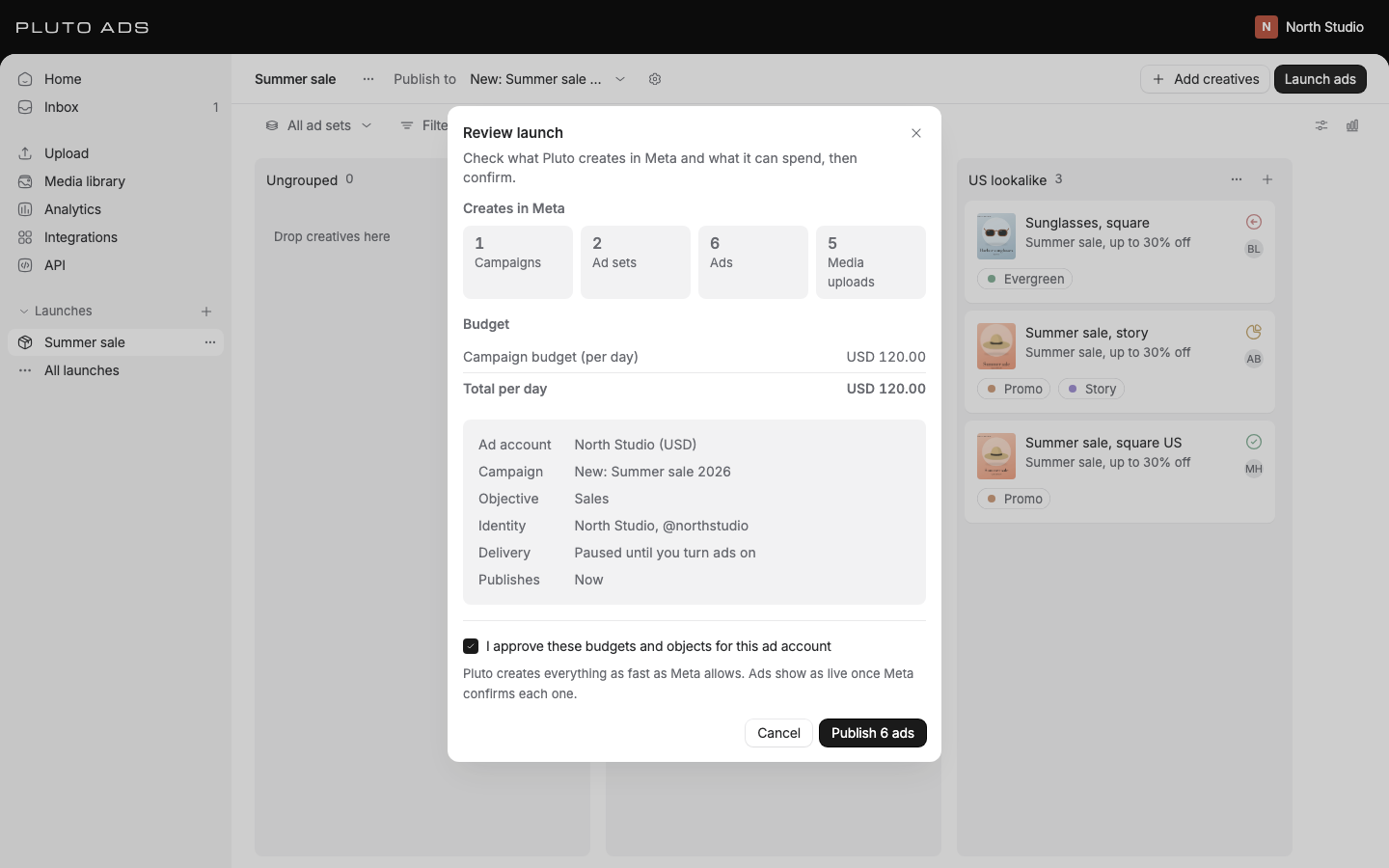
When the checklist is clear, Review launch shows exactly what publishing does, computed by Pluto's servers from the current launch:
- Creates in Meta: how many campaigns, ad sets, ads and media uploads. Creatives in Ungrouped and ad sets without creatives aren't counted (see What publishes).
- Budget: the campaign budget or each ad set's budget, per day or lifetime, in the ad account's currency, with Total per day and Total lifetime. When you publish into an existing campaign without ad set budgets, it says the existing campaign's budget applies.
- Ad account (with its currency), Campaign, Objective for a new campaign, Identity, Delivery and Publishes (now, or the scheduled time).
Check I approve these budgets for this ad account (or I approve publishing to this ad account when the launch adds no budget), then select Publish N ads, or Schedule launch when the launch has a future schedule.
Your approval covers this version of the launch, this ad account and these budgets, nothing else. If anyone changes the launch while the review is open, you see The launch changed since you opened this, the checkbox clears, and you approve the new version. Pluto's servers check the approval again when they receive it, so a stale approval never publishes. Retrying the same approval can't publish twice.
What Pluto creates
Publishing runs in the background on Pluto's servers, in this order:
- Upload media: the images and videos the ads use.
- Create campaign, when the launch creates one. It starts paused and empty.
- Check with Meta: Meta checks every ad set before any ad set, creative or ad is created. If Meta refuses one, nothing else is created: that ad set shows Meta's reason, and the rest show "Not created: Meta's check before publishing found problems in this launch, so nothing was created. Fix what failed and publish again."
- Create ad sets, Create creatives and Create ads.
- Compare with Meta: Pluto checks that what exists in Meta matches the launch. If Meta created something twice after a lost answer, Pluto pauses the extra copy. It never deletes anything.
- Switch on ad sets and Switch on campaign, for delivery set to Active (below).
- Confirm with Meta: Pluto reads everything back.
Large launches work the same way, with hundreds of ad sets and thousands of ads. Pluto creates everything as fast as Meta allows for the ad account and slows down when Meta asks. A restart on either side continues where publishing stopped, and nothing is created twice.
Images upload to the ad account in one request each. Videos take longer:
- The video's poster frame uploads as the ad's thumbnail.
- The video uploads in parts, in the sizes Meta asks for. If the upload stops (Meta or Pluto restarts), it continues from the last part Meta confirmed instead of starting over.
- Meta processes the video. We check every 10 seconds at first, then less often, and create the ad's creative only once Meta reports the video ready. A video Meta is still processing after 2 hours counts as failed.
Each media file uploads once per ad account. A video used by several ads, or published again later, isn't uploaded again.
Whether anything spends right away depends on Initial ad delivery (Launch settings, Ad set defaults, or per ad set):
- Paused (the default): everything stays paused. Nothing spends until you turn it on in the Publishing panel. The review shows Paused until you turn ads on.
- Active: ads deliver once Meta approves them. The review shows Active once Meta approves the ads.
Everything is created paused first, so nothing spends while the rest of the launch is still being created. An ad set set to Active is switched on only once it's complete, with every one of its ads created: its ads first, then the ad set. A new campaign is switched on last, when at least one of its ad sets is. An ad set with ads that weren't created stays paused, and the Publishing panel says why under Kept paused. Fix what failed and publish again, or switch it on yourself. Objects from earlier publishes keep the status you gave them.
Nothing counts as live until Pluto reads it back from Meta. An ad shows as live only after Meta confirms it exists, and the launch reads as published only when every object was created and read back.
To publish later, set Schedule in Launch settings, General. Pluto starts publishing at that time, using the approval you gave. Cancel schedule in the Publishing panel stops it.
Progress
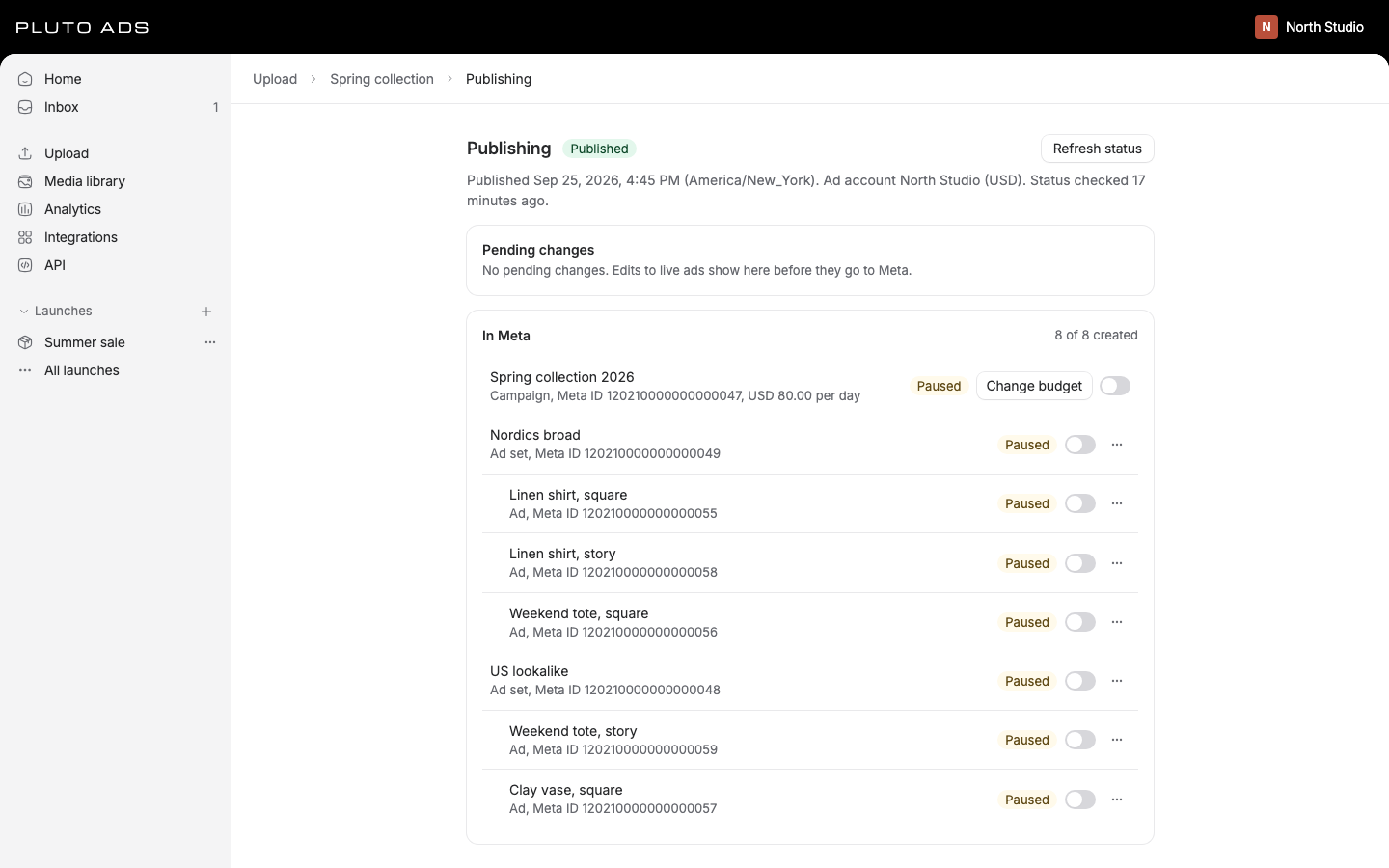
After you publish, the launch header shows Publishing and a banner with View progress. The Publishing panel shows Progress: how many ad sets and ads exist so far (for example "143 of 200 ad sets, 812 of 1,000 ads") and each step from What Pluto creates with how many items are done and failed. When publishing waits, it says why and until when, for example "Meta asked us to slow down. Continuing at 14:32." While a video uploads or Meta processes it, Upload media stays in progress. You can close the panel; publishing continues.
When it finishes, the panel shows the launch's state (Published, Partially published or Failed) and every object under In Meta, grouped by ad set, with its Meta ID, budget and status. Once a launch is published, the header button opens this panel. It reads Publish changes when edits to live ads wait, and Publish 3 new when only new ad sets or ads do.
To stop a publish that hasn't finished, select Cancel publishing. Pluto stops creating what is left. Anything already created in Meta stays there.
Meta's review of your ads
Meta reviews every ad before it delivers. Each ad in the Publishing panel shows Meta's status, for example In review, Active, Paused, Rejected, Has issues or Needs billing info, with Meta's review feedback below it when there is any.
We check the status every 5 minutes while ads are in review, and every hour once each has a decision. Refresh status asks Meta now. When Meta's review of an ad changes, the people who follow the ad get it in their Inbox (see Collaboration).
Errors and how to fix them
An object Meta refused shows an error on its row with Meta's reason. When Meta names a field, the notice has a Fix button (for example Fix headline) that opens the ad, the ad set or the section of Launch settings that holds the field. Fix it, then select Publish again. Pluto creates only what isn't live yet; everything already live stays live. Objects that depended on a failed one show Not created and are created on the next publish.
| Message | What to do |
|---|---|
| Meta didn't accept this | Read Meta's reason and fix the field it names. |
| This can't be sent to Meta | A value Pluto can't send, such as an amount that isn't a number. Fix the field. |
| Reconnect Meta | Meta ended Pluto's access (a password change, an expired session, access removed in Business Settings). An admin reconnects in Integrations. |
| Meta permission missing | Meta no longer grants a permission Pluto needs. Reconnect Meta and keep every permission selected. |
| The ad account can't take new ads | The account was disabled, has an unpaid balance, closed, or left the connection after you approved. Nothing was created. Check it in Integrations. |
| Meta can't find it | Check that the ad account and Page are still in the Meta connection. |
| Meta didn't accept this, with "Meta couldn't process the video" | Meta's reason follows. Export the video again as H.264 MP4 and replace the ad's video with Fix image or video. Publish again uploads the video once more. |
| Meta didn't accept this, with "Meta was still processing the video after 2 hours" | Select Publish again to upload the video again. If it happens twice, export it again as H.264 MP4. |
Temporary problems in Meta (timeouts, errors that pass) are retried by Pluto's servers with growing waits, up to 8 attempts per item, before an item shows as failed. When Meta asks Pluto to slow down, publishing waits as long as Meta says, without using up attempts; an item that is still waiting after 24 hours fails with the reason. Waiting for Meta to process a video doesn't use up attempts either. Only what depends on a failed object waits for it: a failed ad set holds back its own ads, and every other ad set goes on. Every error message and its fix is also in Troubleshooting.
Changes to live ads
Editing a published launch doesn't change anything in Meta right away. Each edit waits as a pending change beside the live version, and Meta keeps running the live version meanwhile. The launch shows how many changes are pending, with Review changes, and each edited ad shows Edited on the board and in the table. Hover it to see Live differs from pending, and select it to open that ad's changes.
Review changes
Review changes lists every pending change, grouped by campaign, ad set and ad, with the Live and the Pending value per field, who changed it and when.
- Every change Meta can make starts selected. Clear a checkbox to leave a field, an ad or a whole ad set out, or use Select all.
- Publish 15 changes sends only the selected changes, one update per object. The rest stay pending. It needs publish access.
- Revert next to a field, or next to an ad or ad set, puts just that back to the live version.
- Discard all puts the whole launch back to the live version for everyone.
A change that follows the launch settings, such as a new default headline every ad uses, can't be reverted on one ad. Change it back in Launch settings, or discard all.
Before anything is sent, each change shows what it does in Meta, and the confirmation sums it up, for example "12 ads back to review. 3 ad sets restart learning.":
- Back to review: Meta reviews the ad again before it delivers the new version. Creative changes do this, and so do targeting and placement changes on an ad set.
- Restarts learning: Meta counts it as a significant edit, so the ad set goes through the learning phase again. That's any targeting or creative change, a new optimization event or bid strategy, and a budget, bid or ROAS goal change of about 50% or more. Meta names no exact amount: going from 100 to 101 is unlikely to restart learning, from 100 to 1,000 may. With a campaign budget, changing the campaign's budget or bid strategy restarts learning in every ad set.
- Can't change in Meta: Meta doesn't allow this change on a live object. It stays pending until you revert it.
If someone changes a selected field while you review, publishing stops and asks you to review again. Nothing is sent. Publishing changes to hundreds of ads runs in the background at the pace Meta allows, and the review shows how far it is, for example Updating 143 of 400 ads.
What Meta allows on a live object:
- Ads: the name, and everything in the creative: copy, image or video, call to action, URL, URL parameters, Page and Instagram account, creative enhancements and multi-advertiser ads. Meta treats a creative change as a new creative and reviews the ad again.
- Ad sets: name, budget, bid amount, ROAS goal, start and end time, delivery, beneficiary and payer. Targeting and placements can change too, and Meta reviews the ads again.
- Campaigns: name, budget and bid strategy.
Anything else, such as the objective, budget type, performance goal, pixel or conversion event, can't change on a live object. To publish such a change, duplicate the launch and publish it as new.
New ad sets and ads added to a published launch aren't in Meta yet. The review lists them under New with Publish 3 new, which opens the publish review for those items only.
Pausing and budgets
People with publish access control live objects from the Publishing panel. These act in Meta directly, without pending changes:
- Pause or activate a campaign, ad set or ad with its switch. Pluto sends the change, then reads the object back from Meta. Pausing the campaign stops every ad set and ad in it.
- Change budget on a campaign or ad set with a budget. Enter the amount as a decimal in the ad
account's currency, like
50or49.99. Meta allows 4 budget changes per ad set per hour; a change over that limit waits and runs at the time shown.
The object's menu also has:
- Change bid on an ad set: the bid cap, cost per result goal or ROAS goal its bid strategy uses.
- Change schedule on an ad set: its start and end, and Ad scheduling (only at certain times of day), which needs a lifetime budget.
- Duplicate: a copy in Meta, optionally with what's inside it and a name suffix. The copy stays paused until you turn it on, unless you choose otherwise under Starts.
- Delete in Meta (see below).
Budgets are always shown in the ad account's currency, exactly as Meta reports them. Pluto never converts or rounds them.
Each ad account can also have a Spending limit, Meta's own hard stop: Meta stops every ad in the account once it has spent that amount. Admins set, change or remove it on Integrations (see Connect Meta). Publishing doesn't check it; Meta applies it.
If Meta or Pluto asks to slow down, the controls stay off until the retry time and turn back on by themselves.
Deleting in Meta
A live ad or ad set can't be deleted from the board: it would keep running and spending in Meta with nothing left in Pluto to stop it. To remove it, open the Publishing panel, open the object's menu and select Delete in Meta. Deleting an ad set also deletes its live ads. This can't be undone.
Pluto deletes the object in Meta, confirms it with Meta, then moves it to the launch's Archived ads (launch menu). Its comments, activity and results stay. Restore as draft brings back a new draft copy you can publish again. To stop spending for now, pause instead.
Archiving a launch
Select Archive in the launch menu to move a launch out of every list. Archiving changes nothing in Meta: live ads keep running and spending. Pause them first if they should stop.
To bring a launch back, open All launches in the sidebar, switch to Archived and select Restore next to it. An archived launch you open is read-only, with Restore launch in its banner and Restore in the launch menu. Restoring needs a connection.
Only a draft that never created anything in Meta can be deleted (Delete in the launch menu). A launch that published is archived instead, so its history and results stay.
Imported launches
Launches you import from Meta show Imported from Meta in the Publishing panel. They work like launches Pluto published: pending changes, pausing, budgets and deleting in Meta. See Connect Meta for importing.
Some settings in Meta have no equivalent in Pluto. Those fields show Managed in Meta with the reason, are read-only in Pluto and are never written back. A pending change to such a field can't publish: discard it, or make the change in Meta Ads Manager.
Good to know
- Publishing never happens by itself. Every publish, including a scheduled one, starts from a person's approval, or from the Agent acting for that person. The Agent asks before it publishes unless the person chose Run everything, and new spend over the workspace's budget guardrail always asks (see Agent). Loops don't publish launches. Every change to what is live starts from a person, a loop someone built, or a credential with publish access.
- A retried publish, budget change or deletion reuses its first request, so it never runs twice.
- Results appear in Analytics once Meta reports them; publishing queues an import of the ad account's results.
- The same steps are in the API (Publishing) and in MCP
(Tool catalogue). Webhooks announce
launch.published,launch.publish_failedandad.review_changed(Webhooks).